
See today clearly
Open Alongside to see overdue, due soon, upcoming and completed care in one prioritized view.
Family caregiver app
Alongside gives families one shared place for medicines, appointments, tasks, care updates and handoffs. Each person can see what needs attention, who is responsible and what has already happened.
Download AlongsideWhy families use Alongside
Messages are useful for conversation, but they do not provide a dependable record of current care. Important details get buried, responsibilities stay unclear and the next caregiver has to reconstruct what happened. Alongside turns everyday care into a shared, structured plan.
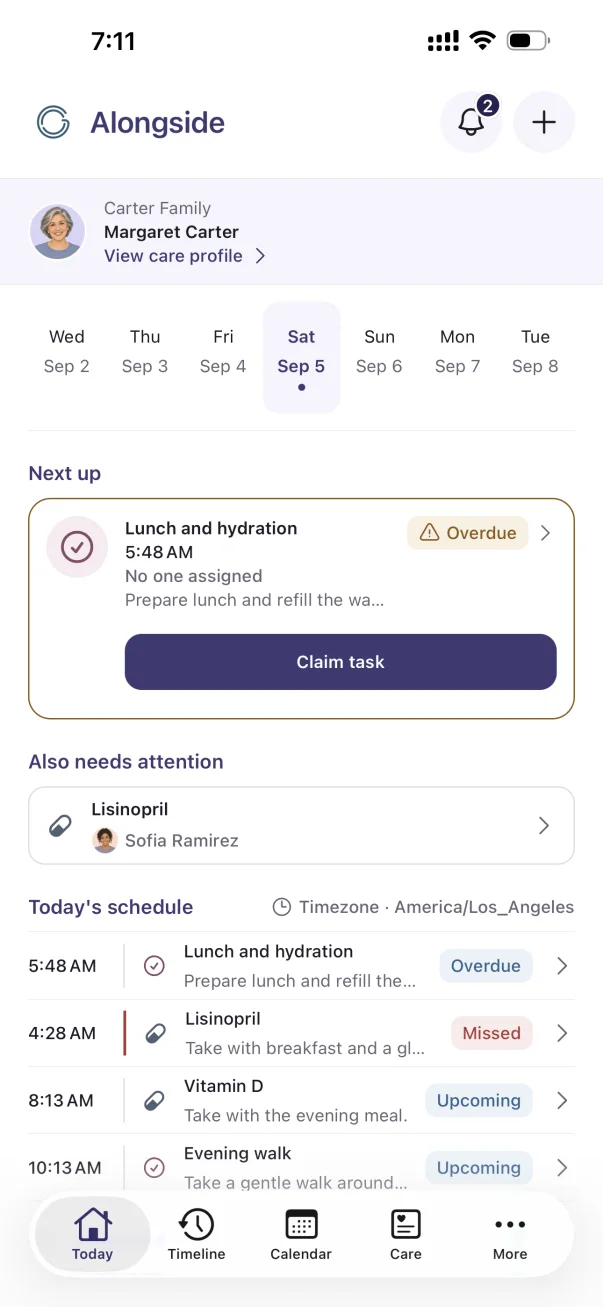
Inside Alongside
Today puts exceptions first, then keeps the rest of the day’s medicines, tasks and appointments in one schedule.
Shown with fictional demonstration care information.
What Alongside helps you do
Open Alongside to see overdue, due soon, upcoming and completed care in one prioritized view.
Assign a medicine, task or appointment to a caregiver, or leave eligible work available for someone to claim.
The Timeline records important care activity with the person and time attached.
Handoff gathers unresolved items, recent changes, observations and the next priorities after time away.
A practical example
A daughter can add a medication schedule, a sibling can claim the pharmacy pickup, and another relative can follow the appointment outcome. Everyone works from the same Care Circle instead of asking for the latest version of the plan.
Common questions
A family caregiver app helps several people organize and follow the same care plan. Alongside covers medicines, tasks, appointments, observations, activity history and structured handoffs.
Yes. An organizer can invite caregivers who help manage care and viewers who need read-only access. Plan limits are shown on the pricing page.
No. Alongside organizes information entered by the family. It does not diagnose, prescribe, check interactions or replace a healthcare professional or emergency service.
A little less to carry alone
Start with Alongside Free. Add more room with Plus when you need it.